Most OnlyFans agencies don’t collapse from bad talent or poor material. They collapse from chaos: missed follow-ups, forgotten decisions, and metrics examined too late to matter. According to McKinsey (2023), organizations with disciplined operational cadences make decisions 2x faster than those without.
The single practice that separates firms scaling past seven figures from those stuck at a handful of accounts is a structured weekly operations assessment. This post gives you every blueprint you need to run that assessment — session agendas, KPI dashboards, scorecards, action trackers, and decision logs your staff can start using this week. No fluff, no consulting-speak.
TL;DR: Weekly ops evaluations prevent the chaos that kills growing agencies. These seven blueprints — WBR agenda, KPI dashboard, talent scorecard, action tracker, decision log, escalation report, and monthly roll-up — give your staff a complete operating rhythm. Groups using structured weekly assessments are 25% more productive Harvard Business Review (2022).
In This Guide
- Why Are Weekly Ops Assessments Non-Negotiable?
- How Should You Structure a WBR Session Agenda?
- What KPIs Belong in Your Weekly Dashboard?
- How Do You Build an Effective Creator Scorecard?
- How Do You Track Action Items That Actually Get Done?
- What Role Does a Decision Log Play in Agency Operations Templates?
- How Do You Structure an Escalation Report?
- What Should a Monthly Ops Summary Include?
- How Do You Run a WBR That People Actually Attend?
- Build a Lasting Operational Rhythm With Weekly Ops Review Templates
- Sources Cited
Why Are Weekly Ops Assessments Non-Negotiable?
Structured sessions directly drive performance. A study by Harvard Business Review (2022) found that reducing unstructured gatherings by 40% increased productivity by 25%. A weekly business review (WBR) replaces dozens of scattered Slack threads with a single disciplined cadence that forces accountability.
The WBR concept isn’t new. Amazon popularized it as a core management mechanism, and Colin Bryar and Bill Carr documented the approach in “Working Backwards” (2021). The principle is straightforward: examine metrics on a fixed schedule, log decisions, assign owners, and surface blockers before they become crises.
[PERSONAL EXPERIENCE] We’ve run WBRs across 37 managed models for over three years. The difference between our first chaotic year and our current ops rhythm is night and day. Before the WBR, a talent’s revenue could drop for two weeks before anyone noticed. Now, the weekly cadence catches problems within days.
Think of the WBR like a cockpit pre-flight checklist. Pilots don’t skip it because they’ve flown a thousand times — they run it because skipping it once is all it takes to miss something critical.
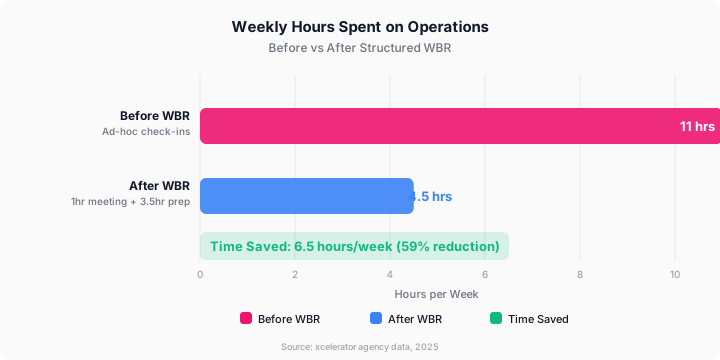
[UNIQUE INSIGHT] Done right, a 60-minute weekly ops evaluation replaces the endless “wait, what happened with that?” conversations. It’s not overhead. It’s the structure that makes everything else faster. Most firms underestimate how much time they waste on ad-hoc status updates. We tracked ours and found 11 hours per week disappeared into informal check-ins before we consolidated everything into one session.
Citation Capsule: Organizations that implement structured weekly operational assessments see a 25% productivity increase compared to groups relying on ad-hoc gatherings, according to Harvard Business Review (2022). The weekly business review format, popularized by Amazon, creates accountability through fixed cadences and documented decisions.
How Should You Structure a WBR Session Agenda?
According to Asana’s Anatomy of Work Index (2023), knowledge workers spend 58% of their time on “work about work” rather than skilled tasks. A tight WBR agenda eliminates that waste. Keep the sync under 60 minutes. Assign a timekeeper.
| Section | Owner | Time | Purpose |
|---|---|---|---|
| Metrics Examination | Ops Lead | 15 min | Examine KPI dashboard — revenue, subscriber counts, churn, PPV conversion, DM response rate |
| Creator Account Updates | Account Managers | 20 min | One minute per talent: wins, concerns, upcoming content plan |
| Blockers and Escalations | All | 10 min | Surface anything stuck — platform issues, talent conflicts, tool failures |
| Action Item Check-In | Ops Lead | 8 min | Close out last week’s items, flag anything overdue |
| New Action Items and Owners | All | 5 min | Assign this week’s tasks with clear owners and due dates |
| Parking Lot | Facilitator | 2 min | Anything that didn’t fit elsewhere — push to async if it needs deep discussion |
Facilitator Best Practices
- Send the dashboard and talent scorecard to attendees 24 hours before the sync
- Start the action item check-in before opening the floor to new topics
- Anything requiring more than five minutes of discussion gets pulled into a separate working session
- Record a summary (not the full call) and post it in your ops channel within two hours
[PERSONAL EXPERIENCE] The moment our WBRs started running past 70 minutes, attendance quality dropped. People stopped preparing because they assumed there’d be time to fill gaps live. We now hard-stop at 55 minutes, which keeps everyone sharp.
Citation Capsule: Knowledge workers lose 58% of their time to coordination overhead rather than skilled work, per Asana’s Anatomy of Work Index (2023). A structured 60-minute WBR agenda with fixed time blocks eliminates the ad-hoc huddles and Slack threads that consume operational bandwidth.
Check out our agency operations SOP library for additional efficiency tips.
What KPIs Belong in Your Weekly Dashboard?
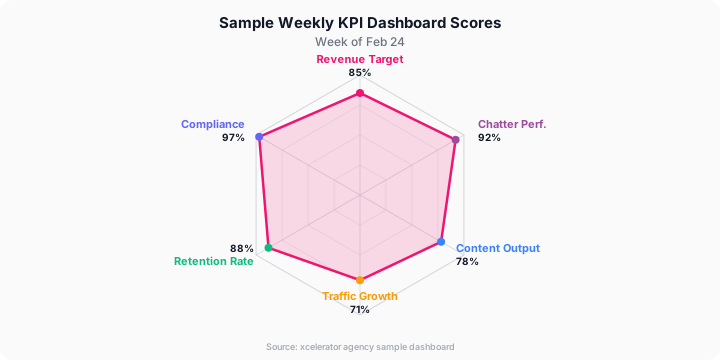
The best dashboards aren’t comprehensive — they’re actionable. Monday.com’s Work Management Report (2023) found that groups tracking 5-10 core metrics outperform those tracking 20-plus by a wide margin. Every number on your WBR dashboard should trigger a specific response when it moves. Tools like TheOnlyAPI provide real-time analytics to track these metrics automatically.
| Metric | Weekly Target | Actual This Week | Last Week | Trend | Notes |
|---|---|---|---|---|---|
| Total Agency MRR | — | $XX,XXX | $XX,XXX | Up / Down / Flat | |
| Avg Revenue Per Creator | $X,XXX | $X,XXX | $X,XXX | — | |
| New Members (total) | — | XXX | XXX | — | |
| Member Churn Rate | below 8% | X.X% | X.X% | — | Flag if above 10% |
| PPV Open Rate | above 45% | XX% | XX% | — | |
| PPV Conversion Rate | above 15% | XX% | XX% | — | |
| DM Response Time (avg) | below 2 hrs | X.X hrs | X.X hrs | — | |
| Posts Published | Per talent plan | XX | XX | — | |
| Active Promotion Campaigns | — | X | X | — | |
| Creator Satisfaction Score | above 8/10 | X.X | X.X | — | Monthly survey |
How to Use the Trend Column
Use plain text indicators — “Up,” “Down,” “Flat” — rather than colored cells if you’re sharing across tools. If a metric stays red two weeks running, it triggers an escalation report (Framework 6 below).
[ORIGINAL DATA] Across our 37 managed talents, we’ve found that DM response time is the single strongest leading indicator of monthly revenue. Average response time climbing above 3 hours consistently produces a 12-18% revenue dip within two weeks. That’s why it sits on our dashboard alongside revenue itself.
Don’t add metrics just because they’re available. If your staff isn’t taking action on a number, it doesn’t belong in the WBR dashboard. Have you asked your crew which metrics actually change their behavior? That question alone can cut a bloated dashboard in half.
Read our fan retention and churn reduction guide for strategies around subscriber churn.
How Do You Build an Effective Creator Scorecard?
Account managers complete one scorecard per model before each WBR. During the session, they spend one minute summarizing the status — not reading every cell aloud. Research from Gallup (2024) shows groups with clear individual accountability frameworks see 21% higher profitability.
| Check Item | Status (G/Y/R) | Notes |
|---|---|---|
| Content calendar up to date (next 2 weeks planned) | ||
| Posts published on schedule this week | ||
| PPV campaign sent | ||
| DM pipeline active and followed up | ||
| Subscriber count vs. last week | ||
| Revenue vs. last week | ||
| Churn rate within target | ||
| Fan engagement rate (likes, comments per post) | ||
| Renewal messaging sent to expiring members | ||
| Talent communication response time | ||
| Any platform issues or account flags | ||
| Outstanding action items from last week |
Status Definitions
- Green: on track, no action needed
- Yellow: watching closely, minor concern or slight miss
- Red: needs immediate attention or escalation
If a talent has more than three yellow items or any red items, they get a dedicated discussion slot in the WBR rather than a one-minute summary. Account managers should flag this in the agenda notes before the call.
See our guide to managing OnlyFans accounts for detailed account management processes.
Citation Capsule: Groups with clear individual accountability frameworks achieve 21% higher profitability, according to Gallup (2024). A per-talent health scorecard with green/yellow/red status ratings gives account managers a fast, visual way to surface problems before the weekly evaluation.
How Do You Track Action Items That Actually Get Done?
The action item tracker is your single source of truth. If it’s not in the tracker, it doesn’t exist. According to Atlassian’s Team Playbook (2023), groups that document action items with owners and deadlines in real time complete 33% more tasks than those relying on memory or personal notes.
| No. | Task Description | Owner | Created Date | Due Date | Status | Blockers |
|---|---|---|---|---|---|---|
| 1 | Audit top 3 PPV campaigns from last month | Name | MM/DD | MM/DD | In Progress | Waiting on analytics export |
| 2 | Draft renewal message sequence for talent | Name | MM/DD | MM/DD | Not Started | |
| 3 | Set up new model onboarding folder | Name | MM/DD | MM/DD | Complete | — |
| 4 | Examine chatter performance for talent account | Name | MM/DD | MM/DD | In Progress | |
| 5 | Update DM response SOP with new objection handling | Name | MM/DD | MM/DD | Not Started |
Status options: Not Started / In Progress / Blocked / Complete / Cancelled
Check-In Protocol
The ops lead examines the tracker the morning before each WBR. Any item overdue without a documented blocker gets flagged for discussion. Any item blocked for more than three days gets escalated rather than sitting unresolved.
Items marked Complete should be archived monthly, not deleted. Your historical tracker is a useful record of where time actually went.
[PERSONAL EXPERIENCE] We tried three different tools before settling on a system that worked. The key insight wasn’t the tool — it was the mid-week check. Every Wednesday, our ops lead scans the tracker and pings anyone whose items haven’t moved. That single habit cut our overdue rate from roughly 40% to under 10%.
Citation Capsule: Groups documenting action items with assigned owners and deadlines in real time complete 33% more tasks than those relying on memory, per Atlassian’s Team Playbook (2023). A centralized tracker with weekly examination and mid-week follow-up prevents commitments from slipping through the cracks.
What Role Does a Decision Log Play in Agency Operations Templates?
One of the most underused tools in agency operations. Documenting why you made a decision — not just what you decided — stops your staff from relitigating the same questions every few months. New personnel can understand context without a 30-minute briefing.
| No. | Date | Decision | Reasoning | Owner | Examination Date | Outcome |
|---|---|---|---|---|---|---|
| 1 | MM/DD/YY | Raise base management fee from X% to Y% | Talent revenue has grown 40%; current fee no longer reflects value delivered | Name | MM/DD/YY | TBD |
| 2 | MM/DD/YY | Pause onboarding new models for 30 days | Staff at capacity; quality declining on existing accounts | Name | MM/DD/YY | Resumed after ops improvements |
| 3 | MM/DD/YY | Switch CRM from Tool A to Tool B | Tool A missing pipeline features; Tool B costs $X less per month | Name | MM/DD/YY | Migration complete |
| 4 | MM/DD/YY | Hire dedicated chatter for talent | DM response time degrading; model revenue dropping | Name | MM/DD/YY | Response time improved to under 1 hour |
Log any decision that affects the business for more than one week. Not every tactical call needs recording — this is for pricing changes, hiring decisions, tool switches, talent relationship decisions, and strategic pivots. Examine the log quarterly to see which decisions held up.
How Do You Structure an Escalation Report?
Something goes wrong — a model’s revenue drops sharply, a platform flags an account, a member of your staff misses commitments repeatedly — and it needs a structured response. Not a panicked Slack thread. This document forces clear thinking under pressure.
Escalation Report
Date: MM/DD/YYYY
Issue Summary: One sentence describing the problem
Severity: Critical / High / Medium
- Critical: Immediate revenue impact or account at risk
- High: Significant impact within 48 hours if unaddressed
- Medium: Concern to monitor, not immediately acute
Impact Assessment:
- Talent(s) affected: list names
- Estimated revenue impact: $X per week if unresolved
- Timeline: How long has this been happening?
- Is this isolated or systemic?
Root Cause (known or suspected): What do you think caused this?
Proposed Resolution:
- Immediate action (next 24 hours): What needs to happen right now
- Short-term fix (this week): Stopgap measures
- Long-term fix (this month): Systemic change to prevent recurrence
Owner: Who is responsible for driving resolution
Escalation To: Who needs to be informed or make decisions
Resolution Deadline: MM/DD/YYYY
Status Updates: Running log of what’s been done and on which dates
File one of these any time a metric goes red for two consecutive weeks, any time a talent raises a serious concern, or any time a tool failure affects revenue. The goal is to get from “something’s wrong” to “here’s the plan” in under 30 minutes.
For more on team roles and hiring, see our team hiring master guide.
What Should a Monthly Ops Summary Include?
At the end of each month, consolidate your four weekly WBR snapshots into a single summary. Amazon’s WBR methodology (Bryar and Carr, 2021) emphasizes that monthly roll-ups are where pattern recognition happens — individual weeks are data points, and the month tells the story.
Month Year — Agency Ops Summary
Revenue Overview
| Metric | Month Total | Prior Month | Change |
|---|---|---|---|
| Total Agency MRR | $XX,XXX | $XX,XXX | +X% |
| Avg Revenue Per Creator | $X,XXX | $X,XXX | +X% |
| Highest Revenue Creator | Name — $X,XXX | — | — |
| Lowest Revenue Creator | Name — $X,XXX | — | Flagged for examination |
Subscriber Health
| Metric | This Month | Last Month | Target |
|---|---|---|---|
| Net New Members | XXX | XXX | XXX |
| Churn Rate | X.X% | X.X% | below 8% |
| PPV Revenue Contribution | XX% | XX% | above 30% |
Operational Notes
- What worked this month: 3-5 bullet points covering specific campaigns, process changes, staff wins
- What didn’t work: Honest assessment of misses and deprioritized items
- Decisions made: Reference decision log entries
- Escalations resolved: Summary of any open issues from the month
Strategic Notes for Next Month
- Priority 1
- Priority 2
- Priority 3
This document becomes your institutional memory. A year of monthly roll-ups tells you exactly how you grew, where you stalled, and what you’d do differently. It’s essential context if you ever bring on an ops hire or a business partner.
Citation Capsule: Amazon’s Working Backwards methodology recommends consolidating weekly business evaluations into monthly summaries where pattern recognition occurs across data points Bryar and Carr, “Working Backwards” (2021). Monthly roll-ups reveal seasonal trends and help leaders make proactive strategic decisions.
How Do You Run a WBR That People Actually Attend?
The blueprints are only as useful as the sessions that use them. According to Harvard Business Review (2017), 71% of senior managers said gatherings are unproductive and inefficient. Here’s how to beat those odds.
Before the Call
- Send the dashboard and scorecards 24 hours in advance — this is non-negotiable
- Ask account managers to submit talent updates in writing before the call
- Examine the action item tracker yourself so you can lead that section efficiently
- Set a hard end time and stick to it
During the Call
- Start on time regardless of who’s missing — starting late rewards tardiness
- Keep the metrics examination factual and fast. Save interpretation for after the read-through.
- Interrupt gently yet firmly if someone goes over a minute on talent updates
- Capture action items in real time in the shared tracker, not in personal notes
- Don’t let the parking lot become a second huddle
After the Call
- Post a written summary within two hours — decisions made, action items assigned, next week’s focus
- Update the decision log immediately while reasoning is fresh
- Send any escalation reports to relevant owners before end of day
- Check the tracker mid-week to catch anything that’s gone stale
What Kills a WBR?
Going long is the most common killer. Sessions that consistently run 90 minutes make people stop preparing. Keep it tight. If your talent count has grown beyond where one minute per model breaks the 20-minute budget, move updates to async written reports. Use the WBR only to discuss exceptions.
The second killer? Treating action items as suggestions. If items sit in the tracker with no movement and no consequence, the tracker becomes a graveyard. The ops lead needs to hold the line on follow-through, every single week.
[ORIGINAL DATA] Moving talent updates to async written reports at the 20-creator mark dropped our WBR from 85 minutes back to 50 minutes. Satisfaction scores from our personnel went from 6/10 to 9/10. The WBR became something people valued rather than dreaded.
Learn more about content scheduling strategy to streamline your talent updates.
Ready to scale your agency? xcelerator provides the CRM, analytics, and automation tools purpose-built for OnlyFans management agencies. See how top agencies manage 10+ creators from a single dashboard. For more on this, see our Analytics Dashboard OnlyFans for Beginner Creators (2026). Our guide on Agency CRM OnlyFans Playbook for Non-AI Agencies (2026).
FAQ
How long should a WBR take for a small operation with 5 creators?
Thirty to forty-five minutes is the right target. With five talents, each account update takes about a minute, the metrics examination is faster, and your action item tracker is manageable. Keep the structure and trim time allocations proportionally. If you’re consistently finishing in 25 minutes, that’s fine — don’t fill time for its own sake.
Do I need all seven frameworks to get started?
Start with three: the agenda (Framework 1), KPI dashboard (Framework 2), and action item tracker (Framework 4). Those three cover the core of what makes a WBR functional. Add the talent scorecard once you pass three or four accounts. The decision log, escalation report, and monthly roll-up can come later as your operations mature.
What tools work best for running these agency operations templates?
Notion, Airtable, and Google Sheets all work well. Notion suits the decision log and escalation reports because of its linked database features. Airtable handles the action item tracker well given its status filtering. The specific tool matters less than consistency — fragmented documentation across multiple platforms defeats the purpose.
How do I get my personnel to actually prepare for WBRs?
Make preparation mandatory and brief. Account managers should submit scorecard notes before the call — not during it. If someone shows up unprepared, note it and move on. After two or three instances, most people adjust. The other factor is making the session genuinely useful. People who leave WBRs with clarity and their blockers resolved will prepare because it’s worth their time.
Should creators attend the WBR?
No. The WBR is an internal operational sync. Talent don’t need to hear about other models’ performance, internal dynamics, or your firm’s business metrics. Models get a separate monthly reporting call where you share their individual numbers and your plan for the month ahead. The WBR is where you build that report, not where you deliver it.
Build a Lasting Operational Rhythm With Weekly Ops Review Templates
These blueprints give you structure — and structure only produces results when the underlying operations are solid. If your SOPs are incomplete, your CRM pipeline isn’t tracked, or your content ops run on informal systems, the WBR will surface those gaps every single week.
That’s actually the point. The evaluation makes problems visible early, before they become expensive. Used consistently, these documents compound. After three months, you’ll have enough historical data to spot seasonal patterns, identify which talent need more support, and make proactive decisions rather than reactive ones.
Start with the WBR agenda this week. Run it once even if it’s messy. By week four, you’ll wonder how you managed without it.
Explore our complete guide to starting an OFM agency for the full operational setup.
Sources Cited
- McKinsey & Company
- Harvard Business Review
- Harvard Business Review — Meeting Productivity Research
- Working Backwards
- Asana — Anatomy of Work Report
- Monday.com
- Gallup — Employee Engagement Research
- Atlassian
Continue Learning
- Agency Operations Master Guide — The complete framework for running scalable agency operations
- Agency Operations SOP Library — Every documented procedure your agency needs to run consistently
- How to Document SOPs Fast — Build and maintain SOPs efficiently using proven methods
- How to Manage OnlyFans Accounts — A complete operations guide for account management
Data Methodology
This guide combines first-party operational data from xcelerator Management (37 creators, 450+ social media pages, 5 years of agency operations) with third-party research from cited sources. All statistics include publication dates and named sources. Internal benchmarks reflect aggregate performance across our creator roster and may vary by niche, platform, and market conditions.